18 Oct 2010
Charles Web Debugging Proxy lets me view all the http / ssl / https traffic between my machine and remote server. I had to pay $50 for it, but it’s already paid for itself. Nice for looking at the packets, headers , responses, XML results and JSON results. And you can also use Charles with Throttling (which sounds like a really dubious website). This lets you see what the broadband-disabled user would be experiencing – always a useful reminder.
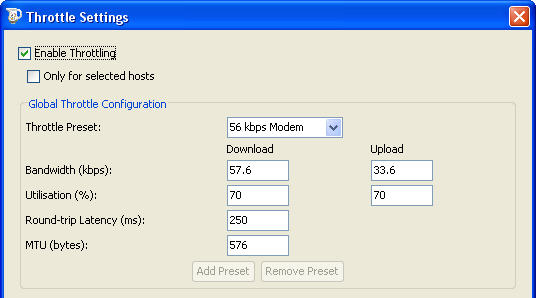
Charles proxy with throttling
And for bonus points – the logo really tickles me. I’ve no idea why the developer choose to use a picture of a nice Victorian milk jug, but why not?

13 Aug 2009
debugging, subversion
Okay, this drove me completely nuts for far too long. Basically, the subversion repository had a file called con.jpg (and one called aon.jpg, bon.jpg, don.jpg but they weren’t an issue) and this caused massive fail when I tried to do a checkout.
Error message:
Can't open "images\alphabet\con.jpg.tmp": the system cannot find the file specified
I deleted files, folders, parent folders, did a fresh checkout and still no joy. And then I cursed subversion, kicked the cat, threw coffee cups out the window, contemplated throwing the laptop out the window, gnashed my teeth … spent some time googling things, spent more time googling with different keywords.
It appears that you cannot have a file or folders in windows called “con” or “con.jpg” or “con.txt” or basically con anything. This isn’t much advertised but it goes all the way back to early DOS days where con was a reserved system word (short for console) I’d mock microsoft, but then I look over my shoulder at certain historical applications which I’ve written and which are still running andI get embarrassed for myself. Anyway, we renamed the con.jpg file in the subversion repository. Everyone else in that team was using Mac/linux so it was just me having weird & wonderful problems.
3 Sep 2007
debugging, excel, microsoft
When you try to open a text file or a comma-separated variable (CSV) file in Excel, you may receive the following error message:
SYLK: File format is not valid
This problems occurs because the first two letters in the file are uppercase “I” and “D”
Yes, that’s right – if you output data to a comma-separated text file and if the first fieldname is “ID” then Bang! Crash! Kaboom! Unhelpful error message! Confused user!
MS knowledge base article about the problem http://support.microsoft.com/kb/323626 confirms that this is a problem with Excel 97, 2000, 2002, and 2003. Two possible fixes: you can change the uppercase “ID” to a lowercase “id” or you can put an apostrophe in front of the “ID”.
A few other things I have done this evening:
- Uploaded pdf files for a customer. (New to the job, got a website to look after, and it’s all rather daunting.)
- Set up example html pages to demonstrate how width of the browser window will affect the page design and layout.
For this site, the designer’s original concept filled the page, and it was liquid, so when you resized the browser the webpage changed to fit. This affects text and image placement in ways which people never understand when they’re looking at a jpg or if you’re trying to explain it to them over the telephone; they’ve got to see a real-life example. So I made one.I used my pictures of a knitted dalek instead of the standard stock images – oddly satisfying.
- Php Problem with one of my sites
Hosting company upgraded to latest version of PHP (5.2.4) over the weekend, and there’s a bug (http://bugs.php.net/bug.php?id=42523) which means that PHP_SELF isn’t giving the correct name for the executing script.
Result : none of the forms work properly.
- Email Problem
Some emails from site are not arriving. Tracked down to a smtp mail relay problem.
Note to self: Should have been picked up in testing last week. In future always test with mail to and from addresses which are outside my main domain.
- Maximum upload size in IIS 6
Trying to explain settings for AspMaxRequestEntityAllowed and MaxRequestEntityAllowed.
- Looking at configuration options for a suite of shopping carts, where we may (or may not) want to show prices, quantities, price + quantity (as a dropdown) or none of the above. It all depends. And it’s confusing.
- Deleted 309 spam comments from the blog moderation queue.
The usual porn, but there were a suprising number about cars and ringtones. Have downloaded and installed the TanTanNoodles Spam Filter
http://tantannoodles.com/toolkit/spam-filter/
And my mother is under the impression that I spend my time making websites.
1 Jun 2007
debugging, php, programming
One of the problems I’ve always had with PHP error handling is catching the fatal errors. If a php script encounters a fatal error it stops, and the desired error handling code does not get executed.
So the user will (usually) be confronted with a blank screen and, worse still, since the error isn’t logged I don’t know about it and therefore can’t fix it.
It’s a rare and confident user who will report a blank page or other such glitch; people are so used to working with a certain level of pain when using a computer that they just assume it’s unavoidable or that it’s been caused by their own inadequacy in some way.
Anyway, (thank-you PHP London user group) I now have a solution using the register_shutdown_function()
<?
register_shutdown_function('cleanExit');

// ... go and do all sorts of exciting stuff ...

$running = false;

function cleanExit() {
	if ($GLOBALS['running'])) {
		// script is still running - it's an ERROR
		// tell Bronwen about the error
		// tell user it's not their fault
	}
}
>
18 Oct 2006
debugging, programming
‘My golden rule : Go slow. Don’t rush. Do one thing at a time.
On nuclear-powered subs, there’s a brass bar in front of the control panel for the power plant. When status alarms begin to go off, the engineers are trained to grab the brass bar with both hands and hold on until they’ve looked at all the dials and indicators, and understand exactly what’s going on in the system. What this does is help them overcome the temptation to start “fixing” things, throwing switches and opening valves. These quick fixes confuse the automatic recovery systems, bury the original fault beneath an onslaught of new conditions, and may cause a real, major disasters. It’s more effective to remember to do something (“Grab the bar!”) than to remember not to do something (“Don’t touch that dial!”)
Debugging: The Nine Indispensable Rules for Finding Even the Most Elusive Software and Hardware Problems